


Enable DBT from NPCI:- Hello Guys Welcome back to Aktricks today I will show you how to enable DBT from the NPCI website step by step. Many people receive government benefits such as LPG subsidy, PM Kisan payments, scholarships, and pensions through DBT. But to receive these payments, your Aadhaar number must be properly linked and mapped with your bank account in NPCI.
In this guide, you will learn what DBT is, how it works, and how you can check or enable DBT through NPCI easily.
DBT is used in many government schemes such as:
- LPG Gas Subsidy
- PM Kisan Yojana
- Scholarships
- Pension schemes
- Other government welfare programs
- Etc…
What is DBT?
Direct Benefit Transfer (DBT) is a system introduced by the Government of India to transfer subsidies and benefits directly into citizens’ bank accounts.
Instead of giving benefits through intermediaries, the government sends money directly to your bank account, which helps reduce corruption, delays, and fraud.
How to Enable DBT Online?
1. At first go to NPCI website
2. Then click on upper left corner 3 lines
3. Then click on Customer
4. Then click on Bharat Aadhaar Seeding Enabler (BASE)
5. Now click on Aadhaar Seeding/Desedding
6. And Fill up all the details
- Enter Aadhaar card number
- click on Seeding >> Fresh Seeding
- Select your bank (if your bank name is not showing then contact your bank)
- Enter Account number
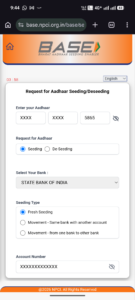
7. Fill captcha and verify with otp
Thats it !
8. You will get a confirmation popups
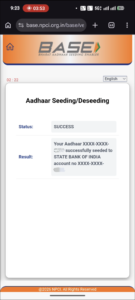
9. Done, Now your Bank account is linked and ready to receive payment.
Thank you for visiting us keep visiting and keep earning.